PD While You Drive – Podcasts

Image

Over the past few months, I have become more and more fascinated by the various podcasts in the iTune Store, and the variety of topics they cover. I have compiled below a list of podcasts that I rely on to increase my knowledge, both professionally but also socially. I have used a lot of what I hear in these Podcasts in my lessons, planning, technology integration and everyday conversation with my students. Since listing to these podcasts doesn’t take any additional time from my day, as I listen on my runs and during my commute, all of this content is without cost to my productivity.


Image

For iOS Downcast is the most impressive app. Allows iCloud Sync between devices and blows the Apple Podcast app away.


Some of my consistent podcasts:

Technology:

Instructional Tech Talk – Jeff Herb
Image

iPad Today – Twit  (This Week In Tech)

MacBreak Weekly – Twit

This Week In Google – Twit

This Week In Tech – Twit

NPR Topics: TEchnology Podcast – NPR

Image

Techstuff – How Stuff Works

Lifehacker Podcast

The Cult Cast – Cult of MacImage

History:

History of Rome – Mike Duncan 

History of WWII

Freakonomics Radio – NPR

Home Screen Share – iPad

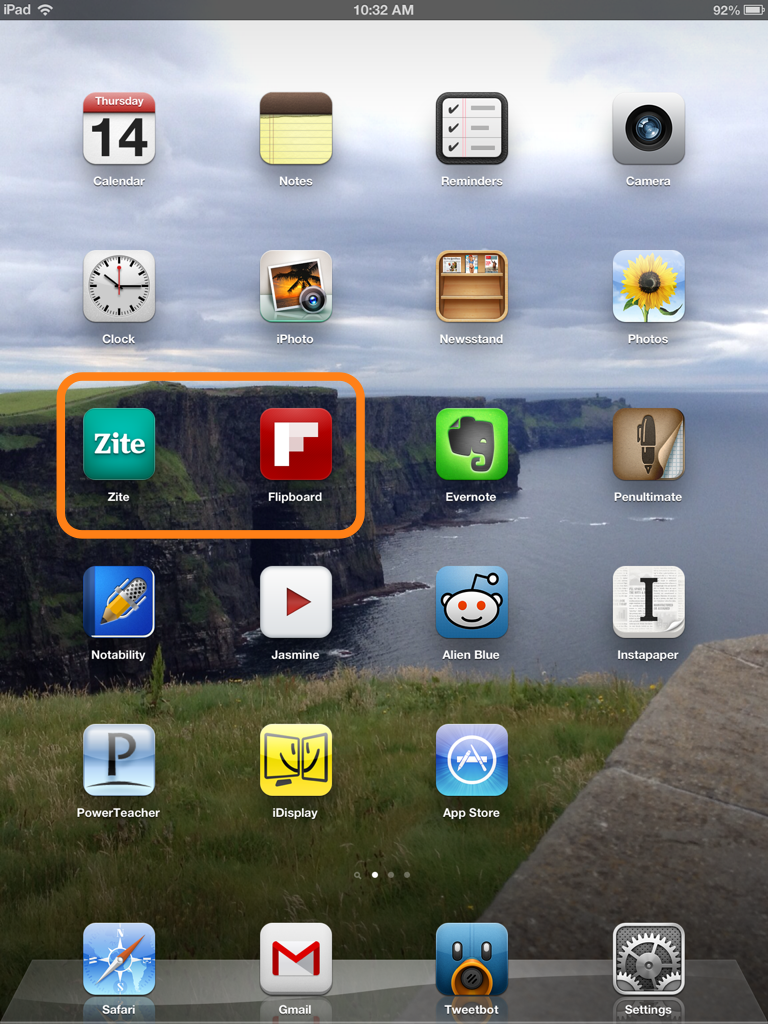
I have seen a lot of people do this, and I was inspired to share the home screen of my iPad. I like this because it allows others to see what apps I use most, and possibly those they could also use. I have included a few pictures and descriptions of apps I use and why.


My Home Screen

photo


News Gathering Apps – Zite & Flipboard

These two apps are essential for my content consumption. Zite gathers news based on ather articles and topics that I read, and populates the app with information that it believes I would enjoy.

Flipboard is a fantastic content provider, as I can run everything from my Google Reader, to Tumblr, to Instagram to Twitter through it. It has a fantastic design and the UI (user interface) is unreal. Both are free.


Photo Skitch Document


iDisplay

This app has become essential for my lesson planning. It was a paid app, and a little pricey at $4.99, but worth it. It allows me to use my iPad as a second monitor. I simply connect it through Wi-Fi and prop my iPad up next to my MacBookPro. This allows me to place a word document on the iPad and conduct research on my laptop monitor.

Photo Skitch Document (1)